The Client
Most of the software a big company runs on lives behind a portal that was never meant to be automated. There's a login, usually an MFA prompt, and a web form built for a person to click through. No API, no SDK, no real way for software, or an AI agent, to do that same work at scale.
Supergood closes that gap. You walk through a portal once while it records the network traffic happening underneath, and from that recording it generates a fully managed API and a set of tools an agent can call. When the portal changes later and the integration breaks, Supergood notices, explains what happened, and patches it.
The Ask
Founder Alex Klarfeld brought me in to redesign and rebuild the Supergood landing page from scratch.
The page had to carry a repositioning. Supergood was moving its whole pitch to lead with agents, and the tagline was shifting away from "Unofficial APIs, officially maintained", which felt a little yucky even to LLMs, toward what's live now: "Agent tools for enterprise portals." It also had to talk to two quite different audiences at once: people building agents who want managed tools to call at scale, and people who have a use case and a portal but wouldn't necessarily call themselves developers. All without splitting the page down the middle.
And it wasn't a whenever-it's-ready project. Alex needed the page out by April 1st to line up with an investor update, so there was a real, externally fixed deadline.
The Process
Alex came to me with a head start. He'd spent a couple of days going through the new page section by section with Claude, nailing down the copy and structure, then handed it over as a rough wireframe with the styling deliberately left blank. It mirrored the bones of their current site but none of the look; the look itself came from Calvin Zheng's designs for the existing site, which I was asked to carry forward. Alex had even baked a "notes" mode into the HTML, annotations you could toggle on where he talked through the parts he wasn't sure about, and walked me through the whole thing over a Loom.
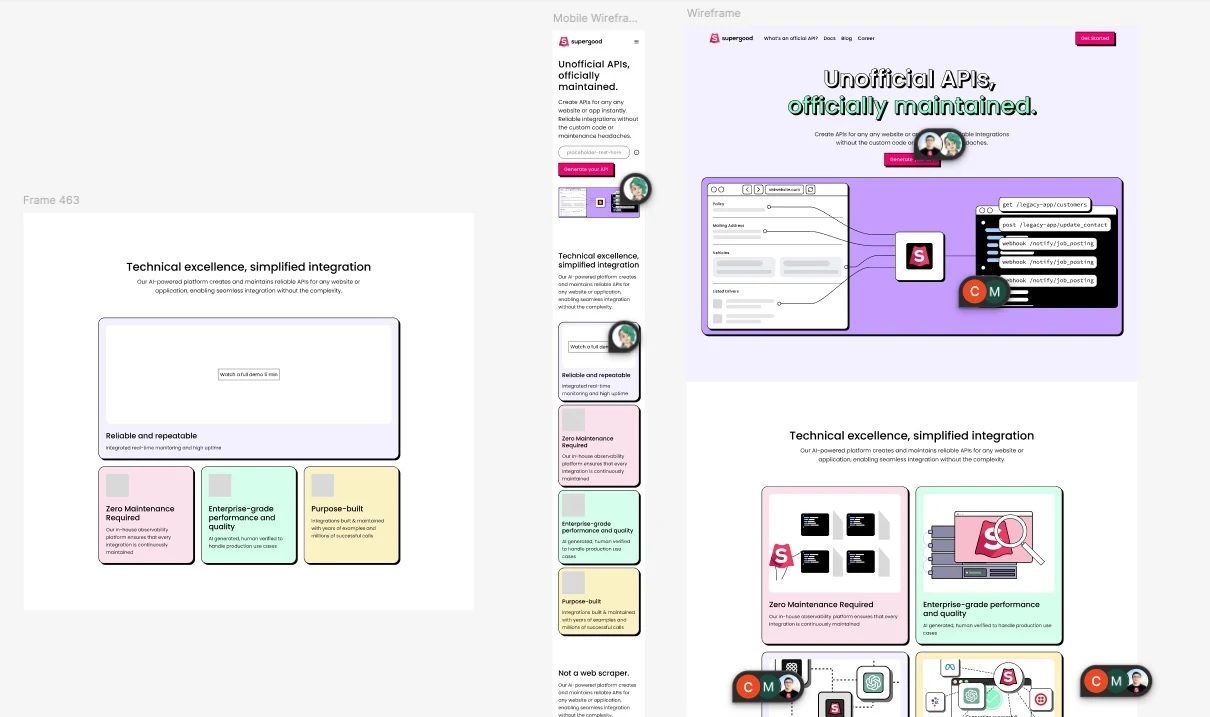
So the copy and section order came in strong. My job was to give it a real design, build it for real, and fill in the parts he'd left open.
The biggest of those was the product itself, which is essentially invisible. Everything valuable about Supergood happens in network recordings, generated code, and integrations that quietly fix themselves, none of which screenshots well. Alex wasn't sure what the main graphic should be either, and floated pulling real screenshots or GIFs from the app. Since there wasn't a polished product UI to grab from yet, I decided the page should just show the product working, and that I'd build those "screenshots" myself.
To keep it from turning into a pile of disconnected mockups, I tied every graphic to one invented but consistent scenario: a property management company automating a vendor portal that has no API. Same company, same portal, even the same work order fields the whole way down, so a dense flow reads like one story instead of a feature dump. I wrote the scenario down as a STORY.md in the graphics directory, a canonical script for the whole narrative, and pointed every graphic (and the AI I was building them with) back at it, so details stayed in sync as the page evolved and Alex could swap the entire scenario later by editing one file.
The headline had to carry the two audiences on its own. One toggle, one sentence that finishes two different ways:
APIs for enterprise portals that agents can't reach.
Generate fully managed tools your agents can call at scale. Ultra fast, reliable and observable. Skip the browser entirely.
On the engineering side, the page lives in Supergood's existing Next.js codebase. Early on I migrated it from JavaScript to TypeScript and typed up the section, card, and use-case content, so the page became structured data the layout maps over instead of a wall of hand-placed markup. On top of Tailwind I built a small kit of reusable components (a Card with composable Eyebrow and Title pieces, a Button, a TerminalCard, a CodeBlock wrapper, a TabContainer, and an animated FAQ accordion), using class-variance-authority for the variants so styling stayed consistent. Alex mentioned he wasn't married to any of the portal logos and wanted them easy to swap, so I made that section data-driven, which paid off later when sourcing and cleaning up the real ones.
Animated in CSS, not Lottie
The product graphics could have been Lottie exports or screen recordings, but I built every one as a live React component animated with CSS (and a little react-spring) instead. That way they stay crisp at any size, restyle instantly from the Tailwind tokens, reflow on mobile, and replay on hover, none of which you really get from a baked animation file or a video.
Each step of the core flow is its own animated UI:
- Auth and MFA: spinning up a managed service account with an auto-generated email, password, and phone number for the MFA codes.
- Record: a split screen walking through the portal (login, work orders, new request, confirmation) while Supergood captures the network logs alongside it.
- Generate: Supergood writing the integration code and deploying the endpoints.
The self-maintaining incident
The hardest idea to sell was that the integration fixes itself. Said plainly it just sounds like a marketing claim, so I built it as a little incident you watch play out instead.
The portal quietly adds a new required "Priority" field to its work order form. The old integration doesn't know about it, so requests start failing with a 422. From there the platform's three observability surfaces each pick up a part of the same incident: an alert states the error in a form both a person and an agent can act on, the audit log shows the failed call next to the ones that succeeded, and the knowledge base absorbs the new field so the docs are correct by the time anyone reads them.
at submitWorkOrder (create.js:6:12)
at ConnectedStoreV2.run (lib/store.js:84:9)
at process.processTimers (node:internal/timers:523:7)
"location": "Unit 4B"
"description": "Fix water leak"
"assignee": "alex@acme.com"
}
Splitting it across three cards was the thing that finally made it land. As one animation it was a blur of unrelated UI; as three, each card gets to make one claim, and the incident becomes the thread running through all of them. Watching it break and heal on its own lands harder than a sentence promising it does.
Terminal cards that type on scroll
The curl and JSON examples live in a TerminalCard whose lines type themselves out one at a time. Each line takes its own delay, and at first the whole thing animated on page load, so by the time you scrolled down to it the payoff was already over. I gated the animation on scroll position so it doesn't start until the card hits the center of the viewport. I also wrote custom syntax highlighting so the curl commands and JSON keys use the brand palette instead of an off-the-shelf theme.
Browser Automation
Launching headless browser...Navigating to login page...Entering username...Entering password...Clicking "Sign In"...⚠ Cookie popup detected. Dismissing...Waiting for MFA prompt...Submitting MFA token...Waiting for dashboard to load...Locating "Units" table...✘ Selector not found. DOM changed.✘ FAILED — 47sSupergood
POST /auth{"email":"alex@supergood.ai"}✓ 200 OK — 4msGET /portal/units?limit=50✓ 200 OK — 12msManila-folder tabs
The use cases are grouped into a tabbed section, and instead of clean modern tabs I styled them to look like an archaic manila folder, colored tabs sticking out the top of a paper file. It fits the blocky brand, but it's also a quiet little jab: these are exactly the kinds of crusty, login-and-a-web-form enterprise systems that never bothered to ship an API, so representing them with the most analog office object I could think of felt right. The section had also started out busy and over-nested, cards inside cards inside cards; pulling it out of its outer card and leaning into the folder metaphor gave it structure without the clutter.
Sync units, manage leases, and automate maintenance
- Sync unit availability across platforms
- Pull rent rolls and financial reports
- Submit and track work orders
Property management systems, leasing portals, maintenance platforms
The Outcome
The redesigned page shipped on deadline and is live at supergood.ai. I also designed the social preview image that shows up whenever someone shares the link.
The full transformation, side by side:
| Before | After |
|---|---|
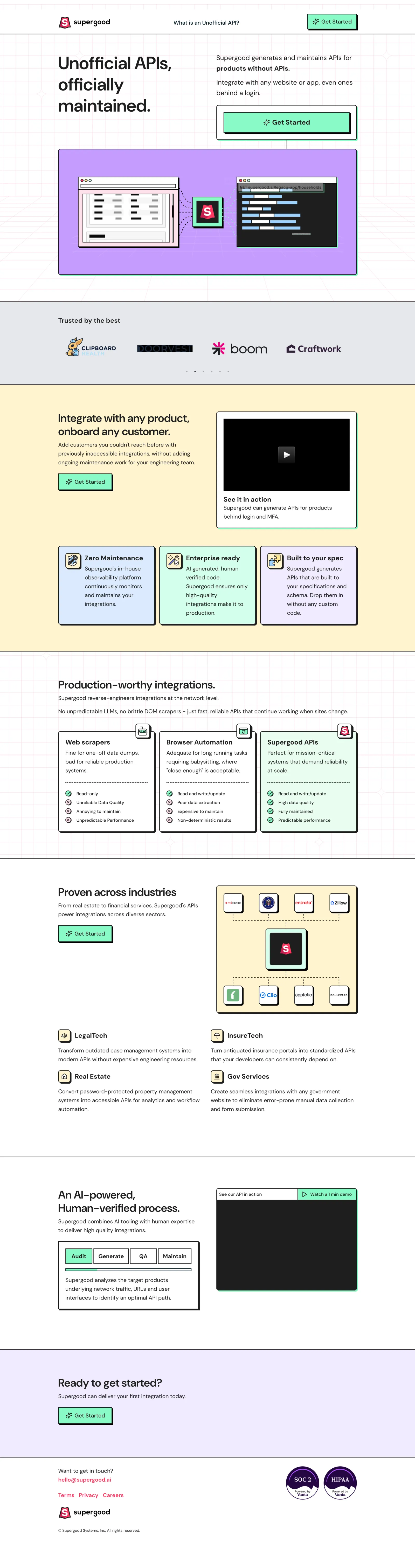 | 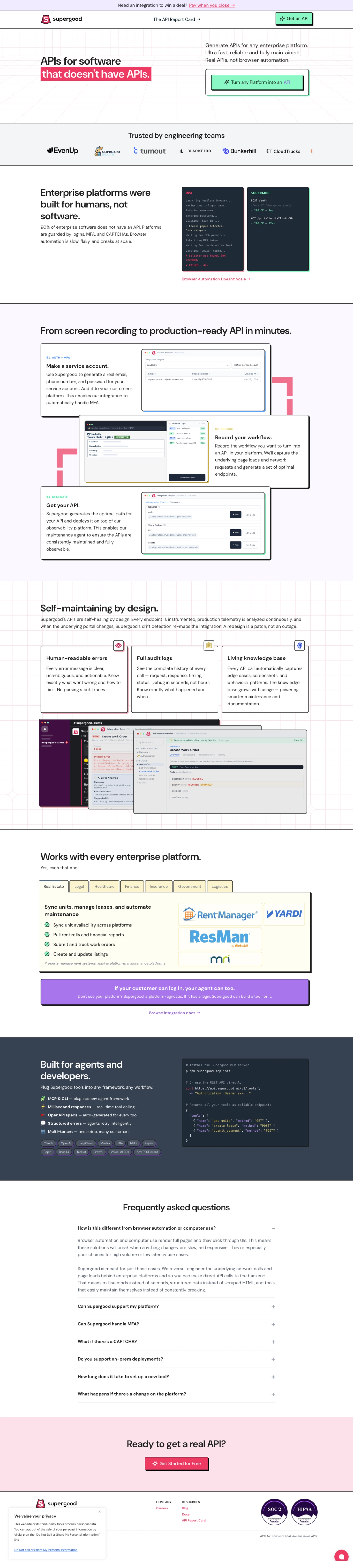 |
Supergood also sits in the middle of something I've been digging into on my podcast, Edge Cases: the whole unofficial API economy that springs up around portals never meant to be automated. Two pieces that pair well with this project: